Nginx server
Changes in php.ini
On CentOS: php.ini is saved in: /etc/php.ini
On Ubuntu: php.ini is saved in: /etc/php/7.0/fpm/php.ini (which 7.0 is php version that installed in your server)
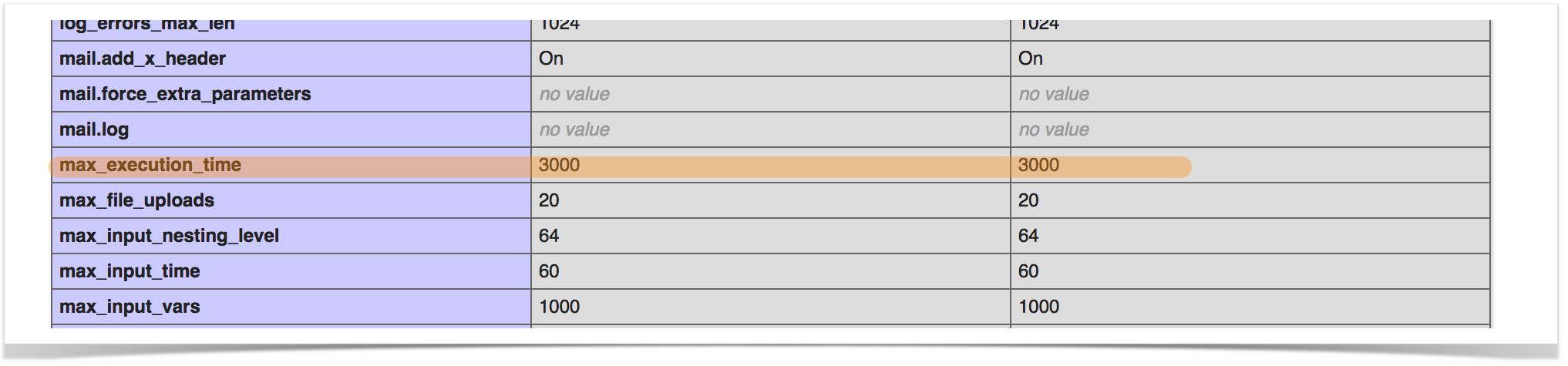
max_execution_time = 3000
Changes in Nginx Config
On file nginx config for your site, add this line fastcgi_read_timeout 3000; like this:
location ~ \.php$ {
                try_files $uri =404;
                fastcgi_split_path_info ^(.+\.php)(/.+)$;
                fastcgi_pass 127.0.0.1:9000;
                fastcgi_index index.php;
                fastcgi_param SCRIPT_FILENAME $document_root$fastcgi_script_name;
                include fastcgi_params;
                fastcgi_read_timeout 3000;
        }
You can preference this tutorial Install phpFox on nginx server for more detail
By Default, the path of nginx config is saved in /etc/nginx/nginx.conf (CentOS) or /etc/nginx/sites-available/default (Ubuntu)
Reload nginx and php
Run these commands:
systemctl restart nginx

#CentOS
systemctl restart php-fpm

#Ubuntu (which 7.0 is php version)
systemctl restart php7.0-fpm
Check your result
Check on phpinfo
Apache Server
/etc/php/7.0/apache2/php.ini